1. Go to Start ----> Run . Type regedit, then enter .
2.Navigate to HKEY_CURRENT_USER --> Software --> yahoo --> pager --> Test
3.On the right pane , right-click and choose new Dword value .
4.Rename it as Plural.
5.Double click and assign a decimal value of 1.
Apr 30, 2011

Apr 2, 2011
Samsung Galaxy 5 (GT-I5500/I5503)
*Hard reset after flashing *2767*3855#
*Check ur Phone Info *#*#1234#*#*
*#*#4636#*#* - Phone Information
[/URL]*2767*3855# - Hard Reset
*#*#7780#*#* - Factory Reset
*#*#7594#*#* - Change End Call/Power Option
*#*#197328640#*#* - Service Mode
*#*#273283*255*663282*#*#* - File Copy Screen (Backup Media Files)
*#*#526#*#* - WLAN Test
*#*#232338#*#* - Shows WiFi MAC address
*#*#1472365#*#* - GPS Test
*#*#1575#*#* - Another GPS test
*#*#232331#*#* - Bluetooth test
*#*#232337#*# - Shows Bluetooth device address
*#*#8255#*#* - GTalk Service Monitor
Codes to launch various Factory Tests:
*#*#0283#*#* - Packet Loopback
*#*#0*#*#* - LCD test
*#*#0673#*#* - Melody test
*#*#0842#*#* - Device test (Vibration test and BackLight test)
*#*#2663#*#* - Touch screen version
*#*#2664#*#* - Touch screen test
*#*#0588#*#* - Proximity sensor test
*#*#3264#*#* - RAM version
Codes to get Firmware version information:
*#*#4986*2650468#*#* - PDA, Phone, H/W, RFCallDate
*#*#1234#*#* - PDA and Phone
*#*#1111#*#* - FTA SW Version
*#*#2222#*#* - FTA HW Version
*#*#44336#*#* - PDA, Phone, CSC, Build Time, Changelist number
*Check ur Phone Info *#*#1234#*#*
*#*#4636#*#* - Phone Information
[/URL]*2767*3855# - Hard Reset
*#*#7780#*#* - Factory Reset
*#*#7594#*#* - Change End Call/Power Option
*#*#197328640#*#* - Service Mode
*#*#273283*255*663282*#*#* - File Copy Screen (Backup Media Files)
*#*#526#*#* - WLAN Test
*#*#232338#*#* - Shows WiFi MAC address
*#*#1472365#*#* - GPS Test
*#*#1575#*#* - Another GPS test
*#*#232331#*#* - Bluetooth test
*#*#232337#*# - Shows Bluetooth device address
*#*#8255#*#* - GTalk Service Monitor
Codes to launch various Factory Tests:
*#*#0283#*#* - Packet Loopback
*#*#0*#*#* - LCD test
*#*#0673#*#* - Melody test
*#*#0842#*#* - Device test (Vibration test and BackLight test)
*#*#2663#*#* - Touch screen version
*#*#2664#*#* - Touch screen test
*#*#0588#*#* - Proximity sensor test
*#*#3264#*#* - RAM version
Codes to get Firmware version information:
*#*#4986*2650468#*#* - PDA, Phone, H/W, RFCallDate
*#*#1234#*#* - PDA and Phone
*#*#1111#*#* - FTA SW Version
*#*#2222#*#* - FTA HW Version
*#*#44336#*#* - PDA, Phone, CSC, Build Time, Changelist number
Feb 4, 2011
Network Cable
Straight Cable
You usually use straight cable to connect different type of devices. This type of cable will be used most of the time and can be used to:
1) Connect a computer to a switch/hub's normal port.
2) Connect a computer to a cable/DSL modem's LAN port.
3) Connect a router's WAN port to a cable/DSL modem's LAN port.
4) Connect a router's LAN port to a switch/hub's uplink port. (normally used for expanding network)
5) Connect 2 switches/hubs with one of the switch/hub using an uplink port and the other one using normal port.
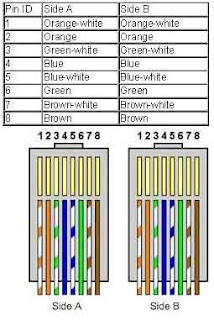
If you need to check how straight cable looks like, it's easy. Both side (side A and side B) of cable have wire arrangement with same color. Check out different types of straight cable that are available in the market here.
Crossover Cable
Sometimes you will use crossover cable, it's usually used to connect same type of devices. A crossover cable can be used to:
1) Connect 2 computers directly.
2) Connect a router's LAN port to a switch/hub's normal port. (normally used for expanding network)
3) Connect 2 switches/hubs by using normal port in both switches/hubs.
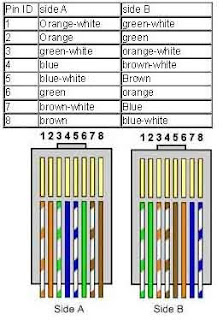
In you need to check how crossover cable looks like, both side (side A and side B) of cable have wire arrangement with following different color . Have a look on these crossover cables if you plan to buy one. You can also find more network cable choices and information from Comtrad Cables.
In case you need to make a crossover cable yourself! You can use this crimper to do it.
Lastly, if you still not sure which type of cable to be used sometimes, try both cables and see which works.
You usually use straight cable to connect different type of devices. This type of cable will be used most of the time and can be used to:
1) Connect a computer to a switch/hub's normal port.
2) Connect a computer to a cable/DSL modem's LAN port.
3) Connect a router's WAN port to a cable/DSL modem's LAN port.
4) Connect a router's LAN port to a switch/hub's uplink port. (normally used for expanding network)
5) Connect 2 switches/hubs with one of the switch/hub using an uplink port and the other one using normal port.
If you need to check how straight cable looks like, it's easy. Both side (side A and side B) of cable have wire arrangement with same color. Check out different types of straight cable that are available in the market here.

Crossover Cable
Sometimes you will use crossover cable, it's usually used to connect same type of devices. A crossover cable can be used to:
1) Connect 2 computers directly.
2) Connect a router's LAN port to a switch/hub's normal port. (normally used for expanding network)
3) Connect 2 switches/hubs by using normal port in both switches/hubs.
In you need to check how crossover cable looks like, both side (side A and side B) of cable have wire arrangement with following different color . Have a look on these crossover cables if you plan to buy one. You can also find more network cable choices and information from Comtrad Cables.

In case you need to make a crossover cable yourself! You can use this crimper to do it.
Lastly, if you still not sure which type of cable to be used sometimes, try both cables and see which works.
Dec 3, 2010
Yahoo Messenger Virus Attack
Virus attack on Yahoo Messenger where it will take control of your messenger and without your knowledge sends some messages with a website links which contains the virus, to your friends list, remind you without YOUR KNOWLEDGE so be careful, There is a very bad. How to resolve this, try to do the following things to remove if your are effected.
Start Menu >> Run
REG add HKCU\Software\Microsoft\Windows\CurrentVersion\Policies\System /v DisableRegistryTools /t REG_DWORD /d 0 /f
copy & paste in run & press enter
REG add HKCU\Software\Microsoft\Windows\CurrentVersion\Policies\System /v DisableTaskMgr /t REG_DWORD /d 0 /f
copy & paste in run & press enter
& delete the files svhost32.exe from ur comp & temp folder after killing the process
If your computer is infected with this virus " It will sends the nsl-school.org url to all of your friend list in yahoo messenger using your ID . So with in few hours many of your friends will get infected with it.
I don't know the actual target of the idiot who created it. May be to advertise his site or to steal very imp data from your computer. I resolved the problem manually from 2 infected PC's. Just go through the below steps carefully.
What are those links ?:
Nsl-school.org or other (Do not open this url in your browser).
If you are infected with it what is going to happen ?
1: It sets your default IE page to nsl-school.org, you can’t even change it back to other page. If you open IE from your comp some malicious code will automatically executed into your computer.
2: It will disables the Task manager / reg edit. So you can’t kill the Trojan process anymore.
3: Files that are gonaa installed by this virus are svhost.exe , svhost32.exe , internat.exe.
you can find these files in windows/ & temp/ directories.
4: It will sends the secured & protected information to attacker
How to remove this manually from your computer ?
1: Close the IE browser. Log out messenger / Remove Internet Cable.
2: To enable Regedit
Click Start, Run and type this command exactly as given below: (better - Copy and paste)
REG add HKCU\Software\Microsoft\Windows\CurrentVersion\Policies\System /v DisableRegistryTools /t REG_DWORD /d 0 /f
3: To enable task manager : (To kill the process we need to enable task manager)
Click Start, Run and type this command exactly as given below: (better - Copy and paste)
REG add HKCU\Software\Microsoft\Windows\CurrentVersion\Policies\System /v DisableTaskMgr /t REG_DWORD /d 0 /f
4: Now we need to change the default page of IE though regedit.
Start>Run>Regedit
From the below locations in Regedit chage your default home page to google.com or other.
HKEY_CURRENT_USER\SOFTWARE\Microsoft\Internet Explorer\Main
HKEY_ LOCAL_MACHINE\SOFTWARE\Microsoft\Internet Explorer\Main
HKEY_USERS\Default\Software\Microsoft\Internet Explorer\Main
Just replace the attacker site with google.com or set it to blank page.
5: Now we need to kill the process from back end. Press Ctrl + Alt + Del
Kill the process svhost32.exe . ( may be more than one process is running.. check properly)
6: Delete svhost32.exe , svhost.exe files from Windows/ & temp/ directories. Or just search for svhost in your comp.. delete those files.
7: Go to regedit search for svhost and delete all the results you get.
Start menu > Run > Regedit >
8: Restart the computer. That’s it now you are virus free.
I don’t know whether any removal patch that works for this Trojan/virus. But we can easily delete it manually.
Start Menu >> Run
REG add HKCU\Software\Microsoft\Windows\CurrentVersion\Policies\System /v DisableRegistryTools /t REG_DWORD /d 0 /f
copy & paste in run & press enter
REG add HKCU\Software\Microsoft\Windows\CurrentVersion\Policies\System /v DisableTaskMgr /t REG_DWORD /d 0 /f
copy & paste in run & press enter
& delete the files svhost32.exe from ur comp & temp folder after killing the process
If your computer is infected with this virus " It will sends the nsl-school.org url to all of your friend list in yahoo messenger using your ID . So with in few hours many of your friends will get infected with it.
I don't know the actual target of the idiot who created it. May be to advertise his site or to steal very imp data from your computer. I resolved the problem manually from 2 infected PC's. Just go through the below steps carefully.
What are those links ?:
Nsl-school.org or other (Do not open this url in your browser).
If you are infected with it what is going to happen ?
1: It sets your default IE page to nsl-school.org, you can’t even change it back to other page. If you open IE from your comp some malicious code will automatically executed into your computer.
2: It will disables the Task manager / reg edit. So you can’t kill the Trojan process anymore.
3: Files that are gonaa installed by this virus are svhost.exe , svhost32.exe , internat.exe.
you can find these files in windows/ & temp/ directories.
4: It will sends the secured & protected information to attacker
How to remove this manually from your computer ?
1: Close the IE browser. Log out messenger / Remove Internet Cable.
2: To enable Regedit
Click Start, Run and type this command exactly as given below: (better - Copy and paste)
REG add HKCU\Software\Microsoft\Windows\CurrentVersion\Policies\System /v DisableRegistryTools /t REG_DWORD /d 0 /f
3: To enable task manager : (To kill the process we need to enable task manager)
Click Start, Run and type this command exactly as given below: (better - Copy and paste)
REG add HKCU\Software\Microsoft\Windows\CurrentVersion\Policies\System /v DisableTaskMgr /t REG_DWORD /d 0 /f
4: Now we need to change the default page of IE though regedit.
Start>Run>Regedit
From the below locations in Regedit chage your default home page to google.com or other.
HKEY_CURRENT_USER\SOFTWARE\Microsoft\Internet Explorer\Main
HKEY_ LOCAL_MACHINE\SOFTWARE\Microsoft\Internet Explorer\Main
HKEY_USERS\Default\Software\Microsoft\Internet Explorer\Main
Just replace the attacker site with google.com or set it to blank page.
5: Now we need to kill the process from back end. Press Ctrl + Alt + Del
Kill the process svhost32.exe . ( may be more than one process is running.. check properly)
6: Delete svhost32.exe , svhost.exe files from Windows/ & temp/ directories. Or just search for svhost in your comp.. delete those files.
7: Go to regedit search for svhost and delete all the results you get.
Start menu > Run > Regedit >
8: Restart the computer. That’s it now you are virus free.
I don’t know whether any removal patch that works for this Trojan/virus. But we can easily delete it manually.
Nov 16, 2010
Troubleshooting CMOS checksum
During POST process, BIOS is capable to trace error on the system, usually when a error occurred, system will be issue a beep sound and comes with a message:
PRESS F1 TO CONTINUE or CTRL + ALT + ESC or DEL TO ENTER SETUP
This article will only explain the error code for the system that using a BIOS type Award only. Please make sure first that the type of BIOS that you are use because each BIOS have different error code.
Error Code for BIOS Award
During this article was wrote, there is only one type of beep sound code and more than 40 types of error for the Award BIOS. One sounds a long beep followed by the two short beeps indicates that there is error in the video that the BIOS is not able to receive video signaling.
The Error message is a message that display on computer screen that is indicates error on the main system board. Among error message that is frequently encountered by users is the type of results to Add-Check (CMOS checksum error). CMOS checksum error problem is usually caused by the failure of the CMOS to get the decision right for the add-check in the BIOS.
Here are 4 types of CMOS checksum error code for the Award BIOS and descriptions:
Error Message BIOS Award
Description
BIOS ROM checksum error - System halted
The add-check results on BIOS in the BIOS chip is not accurate, this indicates that your BIOS code has corrupt. To solve this problem, replace the BIOS with the other BIOS.
CMOS battery failed
CMOS battery does not work. Replace with new battery.
CMOS checksum error - Defaults loaded
Add-check Results CMOS does not exactly because the system had to fit the configuration of origin. Results may indicate add-check CMOS have been corrupt. This error may be caused by a weak battery. Check the battery and replace it with another if necessary.
CMOS CHECKSUM ERROR DISK BOOT FAILURE, INSERT SYSTEM DISK AND PRESS ENTER
Add-check Results CMOS does not accurate and a sign indicates CMOS have been corrupt. This error may be caused by a weak battery. Check and replace battery with other battery if necessary.
When examined the information on the schedule error message, the problem is checksum error is usually caused by weakness in the CMOS battery. To overcome this, you can replace battery with the new battery. Battery can be found at any computer accessories shop at the equitable price.
PRESS F1 TO CONTINUE or CTRL + ALT + ESC or DEL TO ENTER SETUP
This article will only explain the error code for the system that using a BIOS type Award only. Please make sure first that the type of BIOS that you are use because each BIOS have different error code.
Error Code for BIOS Award
During this article was wrote, there is only one type of beep sound code and more than 40 types of error for the Award BIOS. One sounds a long beep followed by the two short beeps indicates that there is error in the video that the BIOS is not able to receive video signaling.
The Error message is a message that display on computer screen that is indicates error on the main system board. Among error message that is frequently encountered by users is the type of results to Add-Check (CMOS checksum error). CMOS checksum error problem is usually caused by the failure of the CMOS to get the decision right for the add-check in the BIOS.
Here are 4 types of CMOS checksum error code for the Award BIOS and descriptions:
Error Message BIOS Award
Description
BIOS ROM checksum error - System halted
The add-check results on BIOS in the BIOS chip is not accurate, this indicates that your BIOS code has corrupt. To solve this problem, replace the BIOS with the other BIOS.
CMOS battery failed
CMOS battery does not work. Replace with new battery.
CMOS checksum error - Defaults loaded
Add-check Results CMOS does not exactly because the system had to fit the configuration of origin. Results may indicate add-check CMOS have been corrupt. This error may be caused by a weak battery. Check the battery and replace it with another if necessary.
CMOS CHECKSUM ERROR DISK BOOT FAILURE, INSERT SYSTEM DISK AND PRESS ENTER
Add-check Results CMOS does not accurate and a sign indicates CMOS have been corrupt. This error may be caused by a weak battery. Check and replace battery with other battery if necessary.
When examined the information on the schedule error message, the problem is checksum error is usually caused by weakness in the CMOS battery. To overcome this, you can replace battery with the new battery. Battery can be found at any computer accessories shop at the equitable price.
Subscribe to:
Posts (Atom)